



Mining digital coins may seem like “easy” money at first, but in reality, there are costs involved for special equipment, upkeep, repairs, electricity expenses, and more.
Not all users are willing to bear these costs but still wish to profit from mining. In such cases, attackers remotely connect to other users’ computers and infect them with a special mining virus (miner), which allows the attackers to mine cryptocurrency on other people’s devices at the owners’ expense.
In this article, we will discuss what a mining virus is, how it can infect your device, and how to detect and remove it. If you want to learn more about mining itself, how it works on different blockchains, what expenses are involved, and how much you can earn from it, check out the article “Mining.”
Introduction to mining
Before we figure out what a mining virus is and how to deal with it, let us briefly review what mining is and how it works. Mining, or cryptocurrency mining, is the process of validating and adding transactions to blocks, which are then combined into a single chain—the blockchain.
A blockchain, in turn, is a distributed ledger stored simultaneously on a large number of independent devices. Each of these devices is a node that can verify transactions and also confirm the validity of checks performed by other participants.
Nodes compete to add new transactions to blocks, as each new block added to the chain earns them a reward in the form of coins of a specific currency. In this way, new coins enter circulation, as cryptocurrencies do not have any other mechanisms for issuance.
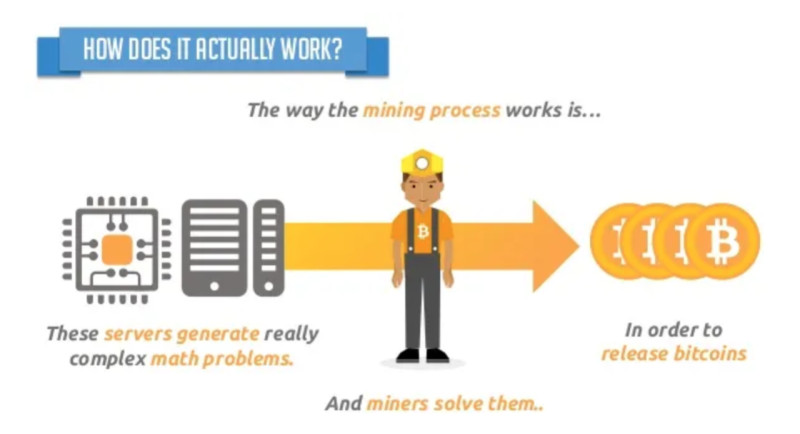
To validate a transaction, a participant needs to perform complex mathematical calculations. Of course, this is done not by the person, but by their equipment. In the early days of digital currencies—specifically the first cryptocurrency, Bitcoin—it was possible to mine directly from a home computer.
However, as interest in digital coins and mining grew, the mining process became more complex. Gradually, standard PCs no longer had enough power, and mining on graphics cards began. At the same time, the first mining farms appeared, which are clusters of multiple devices.
When the power of graphics cards was no longer sufficient, new specialized devices appeared—ASIC miners, which are still used for cryptocurrency mining today. As you can see from all of the above, mining is a highly energy-intensive process that requires substantial resources.
In addition, the cost of such equipment—especially for a farm—is quite high. Not all users have the means or the desire to purchase expensive mining equipment, so they look for other, not always legal, ways to mine cryptocurrency. One of these is hidden mining, which is what we will discuss in this article.
Mining Virus: definition and essence
Now that we understand the mining process and its complexity, imagine that mining can take place without your knowledge or intention. This happens when outsiders use the resources of victims’ devices to mine cryptocurrency.
A mining virus is a malicious program that remotely uses a computer's processing power to mine digital currencies. These programs are installed covertly and run automatically, so the device owner may not even be aware that anything unusual is happening.
Such programs first appeared back in 2017 during the so-called cryptocurrency boom, when coin prices were rapidly rising. Initially, they spread as files that users would download and install on their devices.
To be precise, users were not purposely downloading malicious programs; they were downloading other files that had malware embedded in their code. However, nowadays you do not even need to download anything—just clicking a link in a message in social networks or an email can be enough.
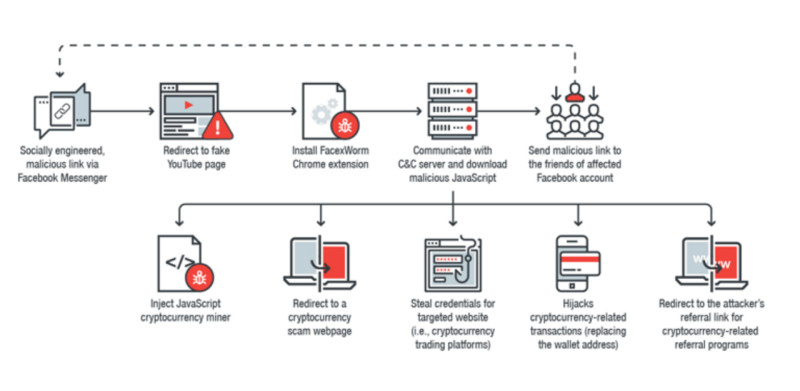
A website accessed via such a link automatically runs a script that begins using the infected device’s resources to mine cryptocurrency. This type of hidden mining is known as cryptojacking.
Moreover, attackers are not interested only in personal devices. Corporate computers and servers are even more attractive to cybercriminals, since it is much harder to detect a mining virus within a large organization.
How hidden mining works
In essence, mining cryptocurrency using malware such as a mining virus does not differ from the ordinary mining process. The key difference is that, in hidden mining, the computing power of third-party devices is used without authorization.
The main goal of cybercriminals is to profit from generating new digital coins on a blockchain. To achieve this, they leverage victims’ device resources to solve complex mathematical problems needed for transaction validation and add them to the blockchain.
Once a solution is found, the generated result is sent to a remote server operated by the hackers. Unlike many other viruses designed to damage or destroy devices, mining viruses are intended to remain undetected for as long as possible.
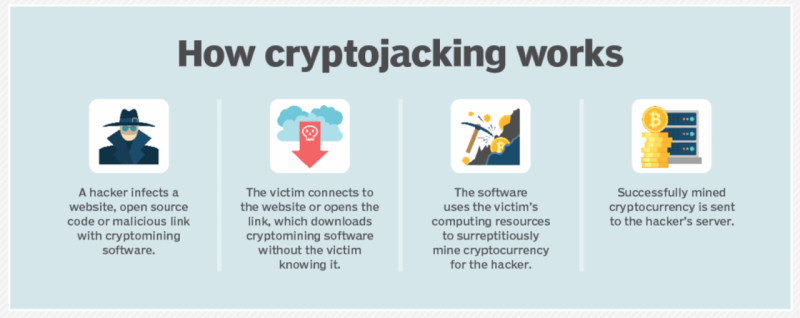
To stay hidden on others' computers, criminals use only a small portion of the device’s processing power. This means that benefiting from a single device is impossible, so hackers must infect large numbers of devices.
All expenses—including electricity bills and hardware wear and tear—are covered by the owners of the infected devices. Often, the victims are users of Windows 10 and 11, since these are the most popular desktop operating systems and are widely used in corporate environments.
Potential hazards of mining viruses
There are different types of mining viruses, and each of them can have varying effects on the device it infects. In addition, several malicious programs can be installed on a single device at the same time, dramatically increasing the load on it. Let’s consider a few main consequences of mining viruses.
| System overload and device overheating | Constant high load on the processor and other PC components significantly reduces device performance, accelerates the physical wear of PC parts, and can lead to their premature failure. |
| System slowdown and increased power consumption | Increased use of computer resources leads to “freezing” (system hangs). As a result, the system fails to handle even basic tasks—editing documents, browsing the web, etc. This also increases power consumption and, accordingly, electricity bills. |
| Theft of personal data | Some viruses not only mine cryptocurrency but also collect users’ personal data for criminals. This can include logins and passwords from various sites, allowing cybercriminals to access user accounts and other confidential information. |
| Blackmail by cybercriminals | Some malware is capable of encrypting data on devices, with criminals subsequently demanding a ransom for its restoration. Other programs may involve infected devices in DDoS attacks. |
As you can see, the dangers of hidden mining go far beyond the unauthorized use of your computer’s processing power. The presence of such viruses on your device can lead not only to premature hardware failure but also to the loss of personal data, which, in turn, may result in financial losses.
How can mining virus infect your device?
When these types of programs first appeared, a mining virus had to be physically installed on the computer. Hackers embedded malicious code into archives or folders, which users would then download to their devices—this is the so-called classic virus scenario.
After downloading such files, the program would automatically install itself on the computer and begin covertly using its resources for mining. A key feature of these programs is that no permission from the device owner is required for them to launch.
Eventually, cybercriminals developed new methods to infect users’ devices. Today, the most common method of spreading mining viruses is known as cryptojacking, which operates via a script embedded on a website.
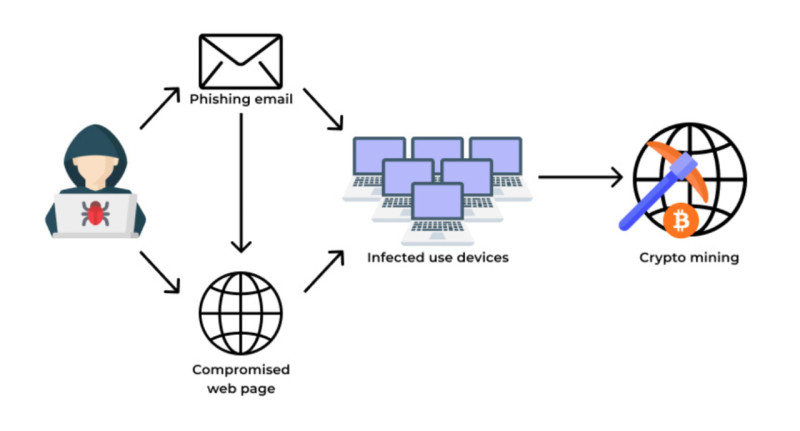
This means there is no longer any need to download files or programs. Merely clicking a link and landing on a web page prepared by attackers is enough. Phishing schemes are often used for this—a website is created that looks identical to an organization familiar to the user, such as a bank or an online shop.
As soon as the user lands on such a site, the script activates and utilizes the computer's resources for hidden mining. The main problem is that the virus is embedded directly on the website, not downloaded to your PC, making it almost impossible for antivirus software to detect and remove. Furthermore, even website owners themselves may not be aware that their sites are "infected."
So, the main ways a device can be infected with a mining virus are as follows:
- Downloading files from unverified sources
- Clicking links from email newsletters, especially those in the “spam” folder
- Installing suspicious programs with additional extensions
- Phishing—using fake websites or apps
How to detect mining virus
Mining digital currencies is a highly energy-intensive activity that significantly overloads the system. However, attackers use various tricks to make their viruses harder to detect: for example, some programs run only when the device is in “sleep” mode and is not being used by the user.
Nevertheless, there are certain signs that may indicate your computer is infected:
1. Overall slowdown of the device. This refers to situations when the computer stops handling simple tasks such as viewing files or videos, opening several tabs in a browser, and so on—none of these actions should normally cause any problems;
2. Overheating of the device. This is about the physical heating of the computer and its individual components, which is especially relevant for laptops. In standard PCs, the cooling system is not designed for such heavy loads and may simply fail. Additionally, due to the increased activity of the cooling system, noise levels may rise;
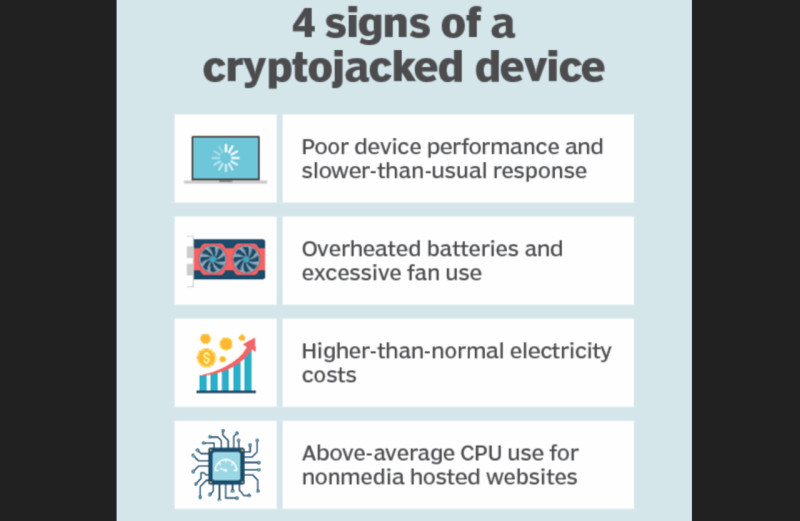
3. Increase in internet traffic usage. This is because mining programs constantly run in the background, requiring a permanent internet connection. It is not always easy to notice this, as many users have unlimited internet plans;
4. Deletion of files without the user's knowledge or, on the contrary, the appearance of new unknown files. Attackers often try to "mask" their programs as system or other files, and their names may include words like "windows," "system," or "program."
Ways to detect mining virus
We have already reviewed the indirect signs that may indicate the presence of a mining virus on your computer. However, for more reliable information, you can use one of the following methods:
1. Through Task Manager;
2. By using third-party programs;
3. With the help of antivirus software.
The Task Manager reflects the overall state of your PC system. It shows which programs or applications are running and how much of your computer’s resources they are using. If you notice unknown programs or processes in this list, especially those significantly increasing the load on your device, you should pay close attention to them.
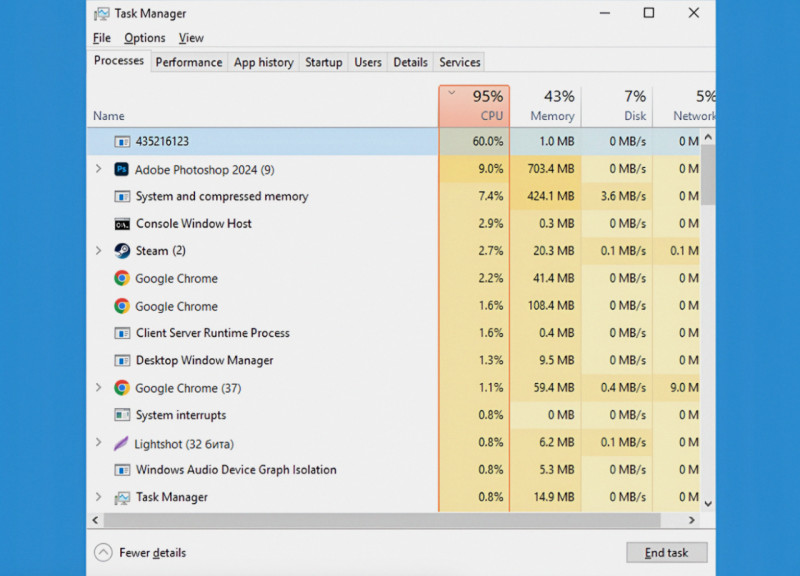
However, this "manual" approach may only be effective for detecting simple malicious programs. More advanced and sophisticated malware is better at "hiding": for example, such programs can automatically shut down if the user launches resource-intensive applications or opens the Task Manager.
There are also specialized websites and services that collect information about malicious programs and allow users to identify them. To perform a check, you need to upload a file from your device, and the system will analyze it; if the file seems suspicious, it will display its name and a description.
Additionally, you can use antivirus software to scan your computer. However, as already mentioned, not all mining viruses are directly downloaded onto your PC—they can work straight from the browser, and in such cases, the antivirus will be of no help.
How to remove mining virus
If a malicious program has already infiltrated your device and has been detected, it is important to know the main ways to remove it. To fully eliminate such a virus, it is not enough to just find the hidden miner itself—you also need to locate the program that installed it.
There are several methods you can use to remove malware from your device:
1. With the help of antivirus software;
2. Using a special “cleaning” utility;
3. Manually.
Using antivirus software is the most logical approach. If you already have such a program on your PC, run a full system scan to check for and detect malicious files. However, as noted earlier, antivirus programs do not always recognize mining viruses, especially if they are not installed directly on the computer.
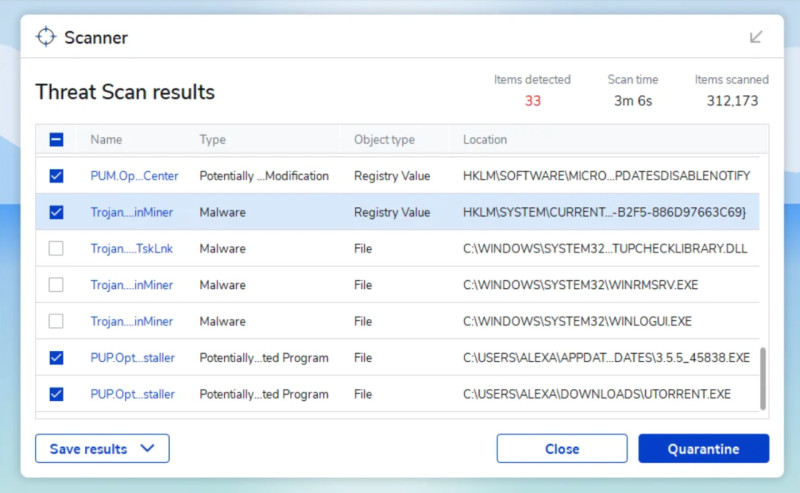
There are modern antivirus solutions that do not require installation on your PC and can be used as a one-time scan. Their advantage is that threat databases are updated daily, making it harder for viruses to hide. After checking and finding malicious programs, the antivirus will offer to neutralize and delete them.
However, sometimes the files that originally installed the mining virus may go undetected and later “re-infect” your computer. In this case, you may need to perform a complete system reinstall or even format the hard drive. However, this can cause loss of important and necessary information.
It is also possible to find and remove malware manually. But, as already mentioned, you may only succeed in deleting the virus itself, but not the program that installed it. In such cases, it is best to seek help from specialists to ensure complete and definitive removal of malware.
After cleaning your computer of a mining virus, it is necessary to monitor the system for a while to make sure that no suspicious processes are running. After deleting malicious files and folders, you should restart your PC several times to ensure they do not reappear.
How to protect your device
Now that you know how mining viruses can get onto your device and what damage they can cause, it is time to discuss how to protect your computer from unauthorized access. We have compiled all the main recommendations on this matter in this section.
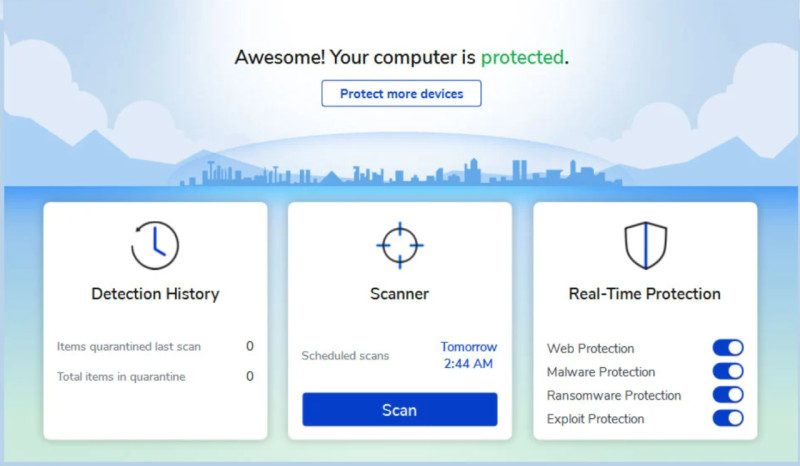
1. Install antivirus software. This is the easiest and most obvious way to identify malicious files and neutralize them before they can harm your device. Additionally, make it a habit to run regular scans or set up automatic scanning.
2. Do not disable system updates. Security and protection against vulnerabilities are improved with updates, making your computer more resilient.
3. Watch for indirect signs of potential virus infection. This could include a general slowdown of your PC—even during simple tasks, overheating, increased electricity or internet usage, and so on.
4. Do not open emails that end up in your “spam” folder. These emails may contain files or links to malicious programs that will be launched on your device as soon as you click them.
5. The same applies to social networks. Do not open links or attachments in messages from strangers in social networks. To avoid opening such messages by accident, you can restrict the receipt of messages or any other content from non-contacts in your settings.
6. Download software only from official sources. “Pirate” software, although free, may contain malware. If you want to save money, look for open-source versions of the programs you need.
7. Scan all external devices before launching them. If you need to connect a flash drive or other external data carrier, scan it for threats with antivirus software before opening it on your device.
8. Create backup copies of your data. Important documents, photos, and other critical files should be stored on a backup device or in the cloud to ensure their safety. In case you need to format your hard drive, you will not lose important data.
Conclusion
In this article, we have covered all the key aspects and signs of the phenomenon known as a mining virus. This is a program that allows cybercriminals to remotely connect to other users’ devices and use their computing power to mine digital currencies.
In addition to overloading the whole system and possibly causing the device or its components to fail, hidden mining carries other risks, namely: theft of personal data, as well as blackmail by attackers.
Such viruses can enter a computer together with other files downloaded from untrustworthy sources or even just after visiting certain websites. After the virus infects the device, users may notice some “indirect” signs of hidden mining: extremely slow performance, overheating, and more.
In this situation, it is worth scanning the computer with antivirus software or manually searching for suspicious files and processes that are consuming excessive device resources. If such programs are found, they should be immediately deleted, and the computer rebooted.
To protect your device, do not open emails or messages from suspicious senders, do not click on links in them, and do not download any files. Additionally, it is recommended to scan your computer regularly and check all external drives for threats.


 Back to articles